PCAN-Diag FD
Regular price£1,548.00 Sale price Pricing excludes VAT.Shipping cost calculated in checkout.
- Message us via the chat bubble (Mon–Fri, 9–5)
- Or give us a call on +44 (0) 1234 247176
GENERAL
| CAN Connection | High-speed CAN connection (ISO 11898-2) |
| CAN Standards | Complies with CAN specifications 2.0 A/B and FD |
| CAN FD Support | CAN FD support for ISO and Non-ISO standards |
| CAN FD Bit Rates | CAN FD bit rates for the data field (64 bytes max.) from 20 kbit/s up to 12 Mbit/s |
| CAN Bit Rates | CAN bit rates from 20 kbit/s up to 1 Mbit/s |
| CAN Transceiver | Microchip CAN transceiver MCP2558FD |
| CAN Connector | CAN bus connection via D-Sub, 9-pin (in accordance with CiA® 106) |
| Display | Display with 800 x 480 pixel resolution |
| Orientation | Portrait or landscape presentation depending on the function and device orientation |
| External Display | Presentation on an external display via a micro HDMI socket (DVI signal with a resolution of 800 x 600 pixels) |
| Memory | Internal memory card for saving projects. Can also be used as a USB mass storage device when connected to a PC |
| Operation | Device operation via a push dial and 4 buttons |
| Operating Temperature | Operating temperature range from 0 to 50 °C (32 to 122 °F) |
POWER SUPPLY
| Power Supply | Power supply via the internal rechargeable batteries or the provided supply unit (low-voltage socket on unit) |
| Battery Charging | Charging of the batteries is carried out with external supply, even during operation |
| Charging Station | Charging station with quick-charging function available as an option (IPEH-003068) |
CAN ANALYSIS FUNCTIONS
| Network Analysis | Analysis of CAN and CAN FD networks at the physical and the protocol level |
| Bit Rate Selection | Selection of the bit rate from a preset list or from multiple user-defined values |
| Bit Rate Detection | Automatic bit rate detection based on a bit rate list |
| Listen-Only Mode | Switchable listen-only mode |
| Silent Startup | Switchable silent startup function (listen-only mode at wrong bit rate) |
| Symbolic Display | Symbolic display of incoming CAN messages using Symbol files, taking into account enums (lists of values), multiplexers, and ID ranges |
| Symbol Editor | Symbol files can be set up using the Windows software PCAN-Symbol Editor supplied with this product |
| Message Recording | Recording of incoming CAN messages to the internal memory card, if required, with CAN ID filtering |
| Trace Playback | Playback of trace files |
| Trace Conversion | Conversion of trace data to various output formats using the Windows software PEAK-Converter supplied with this product |
| Message Transmission | Transmitting individual CAN frames or CAN frame sequences |
| Data Entry | Decimal, hexadecimal, or binary entering of CAN data. Data change of a single transmission message during runtime |
| Symbol-Based Transmission | Transmission of CAN messages with readable ID and data by support of Symbol files |
| Bus Load Measurement | Measurement of CAN bus load, displayed by means of a time diagram, switchable display of error frames |
| Screenshot Export | Bus load time diagrams can be saved as Bitmap screenshots |
| Termination Measurement | Measurement of the termination of the High-speed CAN bus, even while the system is running |
| CAN Termination | Switchable CAN termination for the connected bus |
| Voltage Measurement | Voltage measurement at the CAN connector (D-Sub) for pins 6 and 9 |
| Project Management | Management of device configuration, transmit lists, Symbol files, and all recorded data (screenshots, trace, and CSV files) in projects |
| Bus Off Recovery | Optional auto-reset on Bus Off |
OSCILLOSCOPE FUNCTIONS
| Measurement Channels | Oscilloscope with two independent measurement channels, each with a maximum sample rate of 100 MHz |
| Signal Display | Display of the CAN-High and the CAN-Low signals as well as the difference of both signals |
| Trigger Configuration | Trigger configuration to various properties of CAN messages |
| Frame Triggering | Start and end of frames |
| Error Triggering | CAN errors |
| CAN ID Triggering | CAN ID of individual frames |
| CAN FD Triggering | Bit rate switch of CAN FD frames |
| External Trigger | External measurement devices can be triggered using the banana jack, 4 mm |
| Raw Frame Display | Depiction of raw CAN and CAN FD frames |
| Frame Decoding | Decoding of CAN and CAN FD frames from the recorded signal trace |
| Report Function | Display of various properties and of measuring data of the decoded CAN frame using the Report function |
| Screenshot Export | Current view can be saved as a Bitmap screenshot |
| Memory Depth | Memory depth can be set to up to 1 megasample |
| Data Export | Recorded sample data can be saved as a CSV file |
| Zoom Functions | Extensive zoom functions |
| Time Measurement | Time measurement with a resolution of up to 10 ns |
PCAN-DIAG FD EDITOR SOFTWARE
| Configuration | Convenient configuration of all available settings |
| Transmit Lists | Compilation of transmit lists and sequences |
| Project Support | Device configuration, transmit lists, transmit sequences, and Symbol files can be saved in projects |
| Project Transfer | Projects can be transferred to the memory card of the PCAN-Diag FD using a USB connection |


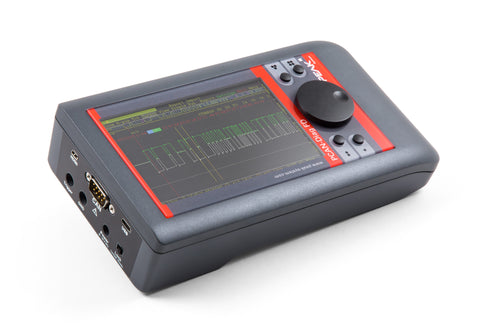
The PCAN-Diag FD is a handheld device for diagnosis of the communication on a CAN bus. Possibilities for diagnosis are available on the protocol layer by handling CAN 2.0 and CAN FD messages as well as on the physical layer by using the oscilloscope function and further measuring functions for voltage and resistance.
The oscilloscope function is used for a qualitative assessment of the signal course on the CAN bus. Two independent measuring channels sample both lines CAN-High and CAN- Low with up to 100 MHz. Based on the signal course, the PCAN-Diag FD decodes CAN frames and shows their elements in the scope graphics.
On the protocol layer, the incoming CAN traffic is shown in a list, optionally with symbolic representation for better interpretability. For future analysis, a tracer is implemented that records the CAN traffic. On the outgoing direction, single CAN messages or even full sequences of CAN messages can be transmitted on the connected CAN bus, e.g. in order to request diagnostic data. Recorded CAN traces can also be played back. All functions on the protocol layer are available for CAN 2.0 as well as CAN FD.
The CAN FD standard (CAN with Flexible Data rate) is primarily characterized by higher bandwidth for data transfer. The maximum of 64 data bytes per CAN FD frame (instead of 8 so far) can be transmitted with bit rates up to 12 Mbit/s. CAN FD is downward-compatible to the CAN 2.0 A/B standard, thus CAN FD nodes can be used in existing CAN networks. However, in this case the CAN FD extensions are not applicable.
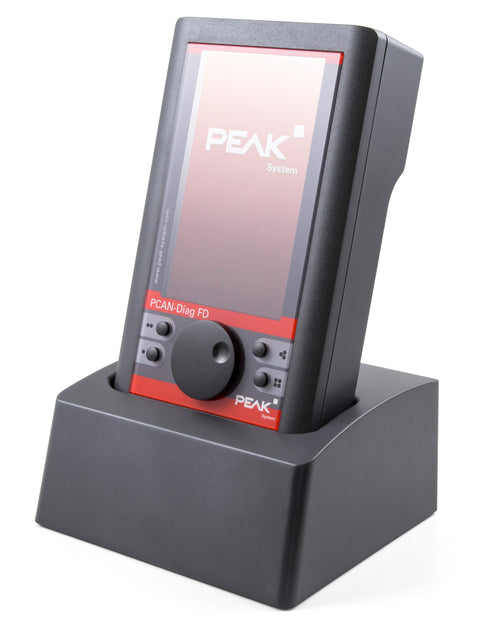
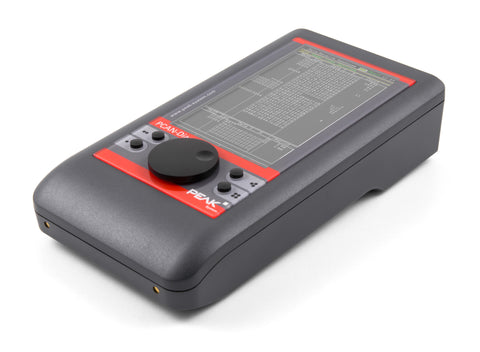
The PCAN-Diag FD is operated in a simple manner with a push dial and four function keys. The device is supplied either externally or by the internal batteries that are automatically charged during external supply. With the optional charging station, the charging process can be accelerated.
GENERAL
| CAN Connection | High-speed CAN connection (ISO 11898-2) |
| CAN Standards | Complies with CAN specifications 2.0 A/B and FD |
| CAN FD Support | CAN FD support for ISO and Non-ISO standards |
| CAN FD Bit Rates | CAN FD bit rates for the data field (64 bytes max.) from 20 kbit/s up to 12 Mbit/s |
| CAN Bit Rates | CAN bit rates from 20 kbit/s up to 1 Mbit/s |
| CAN Transceiver | Microchip CAN transceiver MCP2558FD |
| CAN Connector | CAN bus connection via D-Sub, 9-pin (in accordance with CiA® 106) |
| Display | Display with 800 x 480 pixel resolution |
| Orientation | Portrait or landscape presentation depending on the function and device orientation |
| External Display | Presentation on an external display via a micro HDMI socket (DVI signal with a resolution of 800 x 600 pixels) |
| Memory | Internal memory card for saving projects. Can also be used as a USB mass storage device when connected to a PC |
| Operation | Device operation via a push dial and 4 buttons |
| Operating Temperature | Operating temperature range from 0 to 50 °C (32 to 122 °F) |
POWER SUPPLY
| Power Supply | Power supply via the internal rechargeable batteries or the provided supply unit (low-voltage socket on unit) |
| Battery Charging | Charging of the batteries is carried out with external supply, even during operation |
| Charging Station | Charging station with quick-charging function available as an option (IPEH-003068) |
CAN ANALYSIS FUNCTIONS
| Network Analysis | Analysis of CAN and CAN FD networks at the physical and the protocol level |
| Bit Rate Selection | Selection of the bit rate from a preset list or from multiple user-defined values |
| Bit Rate Detection | Automatic bit rate detection based on a bit rate list |
| Listen-Only Mode | Switchable listen-only mode |
| Silent Startup | Switchable silent startup function (listen-only mode at wrong bit rate) |
| Symbolic Display | Symbolic display of incoming CAN messages using Symbol files, taking into account enums (lists of values), multiplexers, and ID ranges |
| Symbol Editor | Symbol files can be set up using the Windows software PCAN-Symbol Editor supplied with this product |
| Message Recording | Recording of incoming CAN messages to the internal memory card, if required, with CAN ID filtering |
| Trace Playback | Playback of trace files |
| Trace Conversion | Conversion of trace data to various output formats using the Windows software PEAK-Converter supplied with this product |
| Message Transmission | Transmitting individual CAN frames or CAN frame sequences |
| Data Entry | Decimal, hexadecimal, or binary entering of CAN data. Data change of a single transmission message during runtime |
| Symbol-Based Transmission | Transmission of CAN messages with readable ID and data by support of Symbol files |
| Bus Load Measurement | Measurement of CAN bus load, displayed by means of a time diagram, switchable display of error frames |
| Screenshot Export | Bus load time diagrams can be saved as Bitmap screenshots |
| Termination Measurement | Measurement of the termination of the High-speed CAN bus, even while the system is running |
| CAN Termination | Switchable CAN termination for the connected bus |
| Voltage Measurement | Voltage measurement at the CAN connector (D-Sub) for pins 6 and 9 |
| Project Management | Management of device configuration, transmit lists, Symbol files, and all recorded data (screenshots, trace, and CSV files) in projects |
| Bus Off Recovery | Optional auto-reset on Bus Off |
OSCILLOSCOPE FUNCTIONS
| Measurement Channels | Oscilloscope with two independent measurement channels, each with a maximum sample rate of 100 MHz |
| Signal Display | Display of the CAN-High and the CAN-Low signals as well as the difference of both signals |
| Trigger Configuration | Trigger configuration to various properties of CAN messages |
| Frame Triggering | Start and end of frames |
| Error Triggering | CAN errors |
| CAN ID Triggering | CAN ID of individual frames |
| CAN FD Triggering | Bit rate switch of CAN FD frames |
| External Trigger | External measurement devices can be triggered using the banana jack, 4 mm |
| Raw Frame Display | Depiction of raw CAN and CAN FD frames |
| Frame Decoding | Decoding of CAN and CAN FD frames from the recorded signal trace |
| Report Function | Display of various properties and of measuring data of the decoded CAN frame using the Report function |
| Screenshot Export | Current view can be saved as a Bitmap screenshot |
| Memory Depth | Memory depth can be set to up to 1 megasample |
| Data Export | Recorded sample data can be saved as a CSV file |
| Zoom Functions | Extensive zoom functions |
| Time Measurement | Time measurement with a resolution of up to 10 ns |
PCAN-DIAG FD EDITOR SOFTWARE
| Configuration | Convenient configuration of all available settings |
| Transmit Lists | Compilation of transmit lists and sequences |
| Project Support | Device configuration, transmit lists, transmit sequences, and Symbol files can be saved in projects |
| Project Transfer | Projects can be transferred to the memory card of the PCAN-Diag FD using a USB connection |