PCAN-Explorer 7
Regular price£613.00 Sale price Pricing excludes VAT.Shipping cost calculated in checkout.
- Message us via the chat bubble (Mon–Fri, 9–5)
- Or give us a call on +44 (0) 1234 247176
Project Management & Usability
- Management of all settings, information, and files in projects
- Exporting entire projects including linked files to handy packets for archiving or sharing
- Integrated text editor with syntax highlighting for creating and editing of Symbol files, macros, and scripts
- Quick search for elements and commands of the PCAN-Explorer
- Definition of keyboard shortcuts per project for commands, macros, and for setting signal values
- User interface language can be switched (German/English)
- Functionality upgrades with optional add-ins
- Improved performance due to 64-bit foundation and separate processing of communication and user interface
Connection to CAN CC / CAN FD / CAN XL
- Connection with up to 64 buses, independent of their CAN specification
- Simultaneous connections with multiple CAN interfaces independent of their hardware type
- Support for CAN CC (classic CAN 2.0), CAN FD, and CAN XL (ISO 11898-1:2024)
- CAN XL operation modes:
- CAN XL with error signaling
- CAN XL without error signaling
- CAN XL with transceiver mode switch
- Bit rate configuration:
- CAN nominal bit rates up to 1 Mbit/s
- CAN FD data bit rates up to 8 Mbit/s
- CAN XL data bit rates up to 8 Mbit/s (CAN FD compatible mode)
- CAN XL data bit rates up to 20 Mbit/s using transceiver mode switch
- Optional custom bit rates with automatic calculation of register values
- Listen-only mode per connection
- Overview of bit rate, status, error counter, and bus load
- Hardware reset function for the CAN interface
Reception & Transmission
- Sortable receive and transmit lists with ID, length, data, time-outs, message count, and cycle time
- Separate column configuration for CAN, CAN XL, and J1939
- Highlighting of data changes in raw and symbolic views
- Error frame indication per connection
- Display of receive, transmit, and error states
- Message reception resolution up to 1 µs
- Manual and periodic transmission resolution up to 1 ms
- Creation of CAN XL send messages with SDT selection (CiA® 611-1)
- Response to remote frames (CAN CC only)
- Grouping of messages as transmit lists for CAN node emulation
Recording
- Trace logging of CAN traffic including optional error logging
- Multiple tracers for different CAN channels simultaneously
- Recording to file or RAM (linear, dynamic, or circular buffer)
- Export to TRC or CSV
- Conversion to MDF4 and ASC with PEAK-Converter
- Logged message details: time stamp, type, ID, length, data bytes
- Data display in hexadecimal, decimal, or ASCII
- Post-analysis using Symbol files
Playback
- Playback from files or buffer
- Multiple simultaneous playbacks on different channels
- Breakpoints or single-step playback mode
- Optional loop playback
- Playback of selected recording sections
- Support for BLF and MDF4 via PEAK-Converter
Filtering
- Multiple flexible filters for Receive window or traces
- Apply filters live or to existing trace files
- Sequential filter processing per incoming message
- Filter types:
- CAN channel
- CAN ID range
- SJA 1000 Code/Mask
- Symbol-interpreted messages
- Errors, protocol exceptions, overload frames, RTR frames, events
- J1939: PGN, priority, source address, destination address
- CAN XL: PID, VCID, SDT, RRS, SEC, AF, AF mask
Symbolic Representation
- Readable representation of CAN messages using PEAK-System Symbol format
- Assignment of alphanumeric names to CAN IDs
- Bit-exact signal definition with name and data type
- Signal use in add-ins such as Plotter and Instruments Panel
- Real-time monitoring via Watch window
- Bus load available as a signal
- Symbol file creation with PCAN-Symbol Editor or integrated editor
- Multiple Symbol or third-party description files per connection
- Direct use of .dbc and .arxml via Bus Descriptions Add-in
Automation
- Automation with macros, VBScript, or Python
- Test procedures for CAN system development
- Email notification on temperature threshold
- Trigger actions on specific messages
- Excel automation for event-based data logging
- Signal value calculations from incoming messages
- Integrated editor for macros and scripts
- Function key assignment to macros
- Access via PCAN-Explorer object model
- Embedded Python installation included
- Callback libraries and native 64-bit DLL integration
- Programmable processing and modification of CAN data
- Callback execution on receive, before transmit, and after transmit events
System Requirements
- Windows 11 (x64/ARM64) and Windows 10 (x64)
- USB port for portable license dongle (USB-A or USB-C)
- PEAK-System PC CAN interface (with CAN FD or CAN XL support if required)
- Internet connection recommended for activation


PCAN-Explorer 7 - Professional Windows® Software for Monitoring, Analyzing, and Simulating CAN CC, CAN FD, and CAN XL Buses
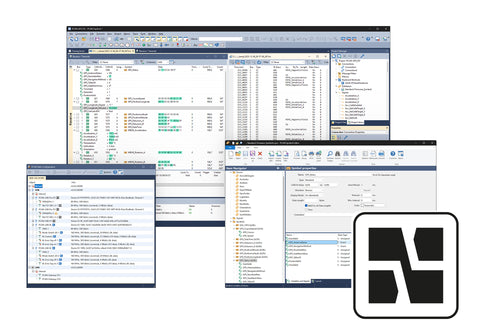
PCAN-Explorer 7 is a comprehensive, professional software for working with CAN CC (Classic), CAN FD, and CAN XL buses. By connecting to one or more CAN buses, users gain access to a wide range of options for monitoring the CAN traffic, individual messages, or specific data signals. Through manual or periodic message transmission, the bus can be directly influenced, for example, for control purposes or simulations.
A central feature of the program is the symbolic representation of CAN messages. With the help of PEAK-System‘s Symbol files or compatible third-party databases, the program instantly translates the hexadecimal CAN IDs and payload data into a readable and easily understandable format.
The trace function allows recording and playback of data traffic from or to several buses simultaneously. For in-depth analysis, playback can be done step by step or with breakpoints. Incoming CAN messages as well as recordings can be filtered using various criteria.
Special requirements as well as the automation of complex processes can be implemented using simple macros, advanced scripts in Python or VBScript, and callback functions. For this, the entire PCAN-Explorer 7 object model is accessible via Python and VBScript.
Furthermore, the functionality of PCAN-Explorer can be extended. PEAK-System offers add-ins that improve data presentation and manipulation capabilities, add compatibility to third-party data definitions like CANdb or ARXML, and even add support for standards such as J1939.
Licensing options:
PCAN-Explorer 7 is available in two licence types:
Single User Licence
Activated on one machine and ideal for individual engineers or dedicated workstations.
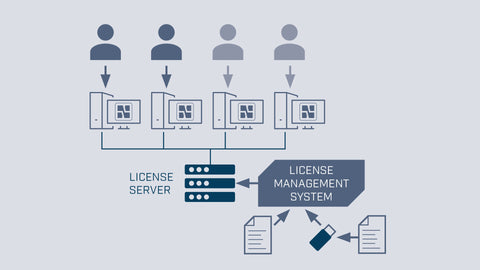
Floating Licence
Hosted on your own licence server and accessible by any authorised machine on your network. Licensed by “seats”, allowing multiple users to share access across a team.
Both licence types are perpetual and include 12 months of maintenance as standard.
What is a “seat” in a Floating Licence?
A seat represents one simultaneous user.
For example, if you purchase three seats, any three engineers can run PCAN-Explorer at the same time. A fourth user would need to wait until a seat becomes available.
Seats refer to concurrent users — not installations. The software can be installed on as many machines as required.
USB Dongle (Optional)
By default, licenses are activated on a specific PC (Single User) or on a licence server (Floating).
A USB dongle is an optional hardware key that allows the licence to be stored on the device instead, enabling use across multiple computers or need to use the software on-site.
The dongle does not include a licence. Licences are purchased separately and transferred onto the dongle. Dongles are not serialised and can be replaced if required.
Learn more about PCAN-Explorer 7
Read our detailed overview of what’s changed in Version 7, including CAN XL support, automation updates, and the add-in ecosystem, view our full PCAN-Explorer 7 article.
Upgrading from Version 6?
When you're ready to make the move, head over to our upgrade guide where you can fill in our migration form and we'll walk you through the whole process.
Project Management & Usability
- Management of all settings, information, and files in projects
- Exporting entire projects including linked files to handy packets for archiving or sharing
- Integrated text editor with syntax highlighting for creating and editing of Symbol files, macros, and scripts
- Quick search for elements and commands of the PCAN-Explorer
- Definition of keyboard shortcuts per project for commands, macros, and for setting signal values
- User interface language can be switched (German/English)
- Functionality upgrades with optional add-ins
- Improved performance due to 64-bit foundation and separate processing of communication and user interface
Connection to CAN CC / CAN FD / CAN XL
- Connection with up to 64 buses, independent of their CAN specification
- Simultaneous connections with multiple CAN interfaces independent of their hardware type
- Support for CAN CC (classic CAN 2.0), CAN FD, and CAN XL (ISO 11898-1:2024)
- CAN XL operation modes:
- CAN XL with error signaling
- CAN XL without error signaling
- CAN XL with transceiver mode switch
- Bit rate configuration:
- CAN nominal bit rates up to 1 Mbit/s
- CAN FD data bit rates up to 8 Mbit/s
- CAN XL data bit rates up to 8 Mbit/s (CAN FD compatible mode)
- CAN XL data bit rates up to 20 Mbit/s using transceiver mode switch
- Optional custom bit rates with automatic calculation of register values
- Listen-only mode per connection
- Overview of bit rate, status, error counter, and bus load
- Hardware reset function for the CAN interface
Reception & Transmission
- Sortable receive and transmit lists with ID, length, data, time-outs, message count, and cycle time
- Separate column configuration for CAN, CAN XL, and J1939
- Highlighting of data changes in raw and symbolic views
- Error frame indication per connection
- Display of receive, transmit, and error states
- Message reception resolution up to 1 µs
- Manual and periodic transmission resolution up to 1 ms
- Creation of CAN XL send messages with SDT selection (CiA® 611-1)
- Response to remote frames (CAN CC only)
- Grouping of messages as transmit lists for CAN node emulation
Recording
- Trace logging of CAN traffic including optional error logging
- Multiple tracers for different CAN channels simultaneously
- Recording to file or RAM (linear, dynamic, or circular buffer)
- Export to TRC or CSV
- Conversion to MDF4 and ASC with PEAK-Converter
- Logged message details: time stamp, type, ID, length, data bytes
- Data display in hexadecimal, decimal, or ASCII
- Post-analysis using Symbol files
Playback
- Playback from files or buffer
- Multiple simultaneous playbacks on different channels
- Breakpoints or single-step playback mode
- Optional loop playback
- Playback of selected recording sections
- Support for BLF and MDF4 via PEAK-Converter
Filtering
- Multiple flexible filters for Receive window or traces
- Apply filters live or to existing trace files
- Sequential filter processing per incoming message
- Filter types:
- CAN channel
- CAN ID range
- SJA 1000 Code/Mask
- Symbol-interpreted messages
- Errors, protocol exceptions, overload frames, RTR frames, events
- J1939: PGN, priority, source address, destination address
- CAN XL: PID, VCID, SDT, RRS, SEC, AF, AF mask
Symbolic Representation
- Readable representation of CAN messages using PEAK-System Symbol format
- Assignment of alphanumeric names to CAN IDs
- Bit-exact signal definition with name and data type
- Signal use in add-ins such as Plotter and Instruments Panel
- Real-time monitoring via Watch window
- Bus load available as a signal
- Symbol file creation with PCAN-Symbol Editor or integrated editor
- Multiple Symbol or third-party description files per connection
- Direct use of .dbc and .arxml via Bus Descriptions Add-in
Automation
- Automation with macros, VBScript, or Python
- Test procedures for CAN system development
- Email notification on temperature threshold
- Trigger actions on specific messages
- Excel automation for event-based data logging
- Signal value calculations from incoming messages
- Integrated editor for macros and scripts
- Function key assignment to macros
- Access via PCAN-Explorer object model
- Embedded Python installation included
- Callback libraries and native 64-bit DLL integration
- Programmable processing and modification of CAN data
- Callback execution on receive, before transmit, and after transmit events
System Requirements
- Windows 11 (x64/ARM64) and Windows 10 (x64)
- USB port for portable license dongle (USB-A or USB-C)
- PEAK-System PC CAN interface (with CAN FD or CAN XL support if required)
- Internet connection recommended for activation